Objective
The ARM Cortex-M architecture includes a facility for sending/receiving user data through special debug ports. This facility is well suited for typical printf() debug practices, where a typical serial port is utiliced. In theses cases, the idea is to write in my program something like this,
#include <stdio.h>

void main (void) {
   printf("Hello, world!");
}
and use the “Debug (printf) viewer” option avaible in Keil MDK-ARM (and other environments) to show a terminal where messages are received. See bellow

These are my notes in order to get this mechanism working on the STM32F4 Discovery kit using the Keil environment.
Some vocabulary.
ITM:
SWV: Serial Wire Viewer
St-Link/V2 upgrade and drivers
The STM32F4 Discovery includes a built-in St-link/v2 debug interface. According with its manual, the SWV facility is available in this interface and the hardware lines are propagated in the schematic of the Discovery kit.
Steps:
1 – Download drivers and utilities from the support page for St-Link/v2 for Windows Xp and 7
2 – Install drivers (?Uninstall previous driver from the control panel)
3- Upgrade St-Link/v2 interface of the discovery running the ST-LinkUpgrade.exe utility
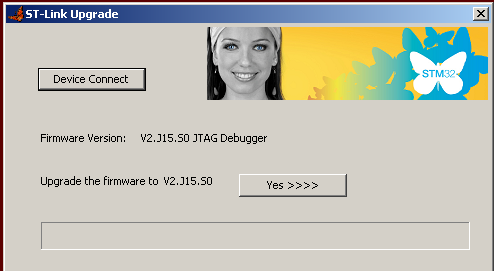
Configuring a Keil project
(But not working completly OK)
Assuming you have a working example for the previous debugger version. (Try to) follow these steps:
1 – Open your project and open the “target options” dialog
2 – Select the second “St-link debugger”

3 – Select “settings” and set options according to the next images.

(Here, be carefull with the speed of the core).

(This a trick for flashing the microcontroller)

Redirecting/retargeting printf() in my program
Create a C module that includes the following code and add it to your project
/**
   @file fputc_debug.c
   @brief Trying to redirect printf() to debug port
   @date 2012/06/25
*/

#include <stdio.h>
#include <stm32f4xx.h>

int fputc(int c, FILE *stream)
{
   return(ITM_SendChar(c);
}
And start playing!
To be solved!!!!
The problem now is that the code is not flashed when entering in debug mode. I follow these steps:
1 – Rebuild completly the project (to avoid that the systems assumes that the build has been done)
2 – Flash the microcontroller with the “load” button
3 – Start debugging

THX! It’s working finde 🙂